


ZFTP is a file transfer program which supports the transfer of formatted, unformatted and ZEBRA RZ files (CMZ, HBOOK, etc.). Formatted files are typically KUIP macros, command or EXEC files, source code or even FZ ALPHA exchange format files. Unformatted files may be FZ binary exchange format or EPIO files, or any other binary file with fixed length records. ZFTP also provides LS, CD, PWD and RSHELL commands. It provides a common interface on all systems and the possibility of macros (via KUIP). It avoids the problems of file format conversion that occur when transferring binary files to UNIX systems.
PAM files may be transferred in CARD, CETA, CMZ or even compact binary PAM format. (In the first release this last format is limited to 32 bit machines.) This is particularly convenient for software distribution amongst disparate hardware types.
The advantages of using ZFTP are best explained via examples. Suppose one creates an HBOOK file (which is stored in ZEBRA RZ format) on the IBM and that is required on a VAX. Without ZFTP, the file must first be converted to sequential format using the RTOX utility. The output file can then be transferred to the VAX via Interlink or standard FTP but must then be reconverted to RZ format using the RFRX utility. This requires extra disk space on both sides for the sequential file and a three-step process. On some UNIX systems the situation is even worse as the file transferred by FTP cannot be read by RFRX but must be converted for a second time.
The same operation using ZFTP is much simpler:
Using this single stage operation the file is transferred with automatic conversion from IBM to VAX format. As the user interface of ZFTP is based on KUIP, the power of ZFTP may be extended using macros.
Data transfer rates are currently about 2/3 of those obtainable with standard FTP, but the effective transfer rate achieved by the elimination of the conversion to sequential format and back is much higher.
Example of a ZFTP session
VXST? zftp crnvmc
system 'crnvmc' service 'zserv'
Remote host/port = crnvmc/17303
Name (crnvmc:jamie):
fmsn201
Password (crnvmc:fmsn201):
crnvmc: loading zserv exec (30 sec timeout)...
Connected to crnvmc on TCP port 1305 at Wed Sep 19 12:43:49 1990
ZFTP>
ZFTP> pwd # Show current working directory
Current working directory is FMSN201 191
ZFTP>
ZFTP> cd fat3.192 # Change to FAT3 192
Remote directory changed to FAT3 192
ZFTP>
ZFTP> ls cspack.cards -l # Directory listing
CSPACK   CARDS    A1 F         80      10406        204  9/17/90 14:33:37 ZEBRA
ZFTP>
ZFTP> geta cspack.cards = s # Transfer file displaying statistics
 File transfer completed
 Transferred       261512 bytes, transfer rate =    4.636364     KB/S
 Elapsed time = 00:00:55 CP time =    6.590000     sec.
ZFTP>
ZFTP> cd fmsn201 # Back to home directory
Remote directory changed to FMSN201
ZFTP>
ZFTP> ls
FATSENDR EXEC     A1
FMCHARM2 KUMAC    A1
FXFILE   BIG      A1
FXFILE   DAT      A1
GETZS    EXEC     A1
LASTING  GLOBALV  A0
PROFILE  EXEC     A1
ZSERV    MODULE   A1
ZFTP>
ZFTP> getb fxfile.dat = 32400 s # Transfer a ZEBRA FZ exchange file
 File transfer completed
 Transferred           10 records, transfer rate =    31.60000     KB/S
 Elapsed time = 00:00:10 CP time =   0.9100000     sec.
ZFTP>
ZFTP> rm fmcharm2.kumac # Delete a remote file
ZFTP>
ZFTP>
ZFTP> cd fmcndiv
Remote directory changed to FMCNDIV
ZFTP>
ZFTP> getrz cern.fatrz = s
File transfer completed


     NREC    NWORDS    QUOTA(%)  FILE(%)   DIR. NAME
       2       1187      0.00     0.00   //RZ/CNDIV/CERNLIB/SUN
       3       2211      0.00     0.00   //RZ/CNDIV/CERNLIB
       2       1350      0.00     0.00   //RZ/CNDIV/JUDY
       2       1839      0.00     0.00   //RZ/CNDIV/JAMIE
       8       6424      0.01     0.01   //RZ/CNDIV
      12      10520      0.01     0.01   //RZ
 Transferred           41 KB, rate =    8.200000     KB/S
 Elapsed time = 00:00:05 CP time =   0.6700000     sec.
ZFTP>
ZFTP> q
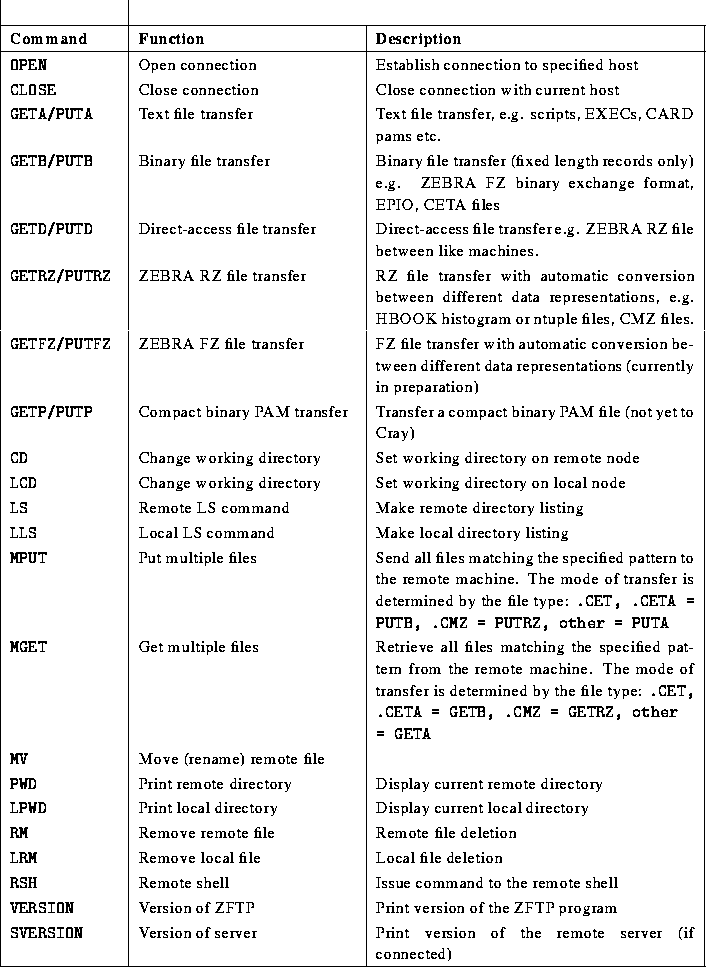
: ZFTP commands (continued)