
The default version of TeX installed at CERN on Linux is the one that comes with the "standard" Linux Distribution (CERN 7.3.3) and is a few years old (LaTeX is from 1999). It is all right for most common applications, but a more recent distribution (see below) might be more appropriate.
At the end of 2003 the latest Linux release of TeXLive (September 2003) was installed on AFS, so that the most recent versions of LaTeX and its packages can be used.
To have access to this release (Linux only), add the directory
/afs/cern.ch/sw/XML/TL8/bin/i386-linuxat the beginning of your PATH variable (do not append it at the end since that will most probably make you use the older default version that comes with the operating system).
One interesting characteristic of this release is that for the first time the LaTeX format has been compiled with e-TeX, the extended version of TeX, which offers some interesting additional features, especially in the area of better support for debugging. LaTeX at CERN has hyphenation patterns for over 25 languages (see below) preloaded, so that, after choosing the relevant language (e.g., with the babel package) your typeset output will be customized for that language.
> PATH=/afs/cern.ch/sw/XML/TL8/bin/i386-linux:$PATH
> export PATH
> latex
This is e-TeXk, Version 3.141592-2.1 (Web2C 7.5.2)
 %&-line parsing enabled.
 (/afs/cern.ch/sw/XML/TL8/texmf/web2c/cp8bit.tcx)
**\relax
entering extended mode
LaTeX2e <2001/06/01>
Babel <v3.7j> and hyphenation patterns for english,
dumylang, nohyphenation, basque, czech, slovak, german,
ngerman, danish, spanish, catalan, finnish, french,
ukenglish, greek, croatian, hungarian, italian, latin,
mongolian, dutch, norwegian, polish, portuguese,
russian, ukrainian, serbocroat, swedish, loaded.
*
On Nice-2000 or Nice-XP the TeXLive 2003 release is available on dfs for installation on your Windows computer. You can install it, for instance on your local C: hard disk, by running the setup script
\\cern.ch\dfs\Experiments\sw\texlive\fptex\TeXSetup.exeYou will then be presented with the following start-up screen.
Choose "Install for all users" and hit the Next
button,
which will proceed to the screen where
the source directory of the TeX files is to be specified.

Here, in the Source Directory part, choose Local Directory
/ ZIP files
, and then in the CDROM / Local depot for
files part, you have to specify the correct path to the
fptex files (they are in the same directory as the
TeXSetup.exe executable). Then hit the Next
button,
which will proceed to the screen where the root directories of the TeX
installation on your PC can be specified.
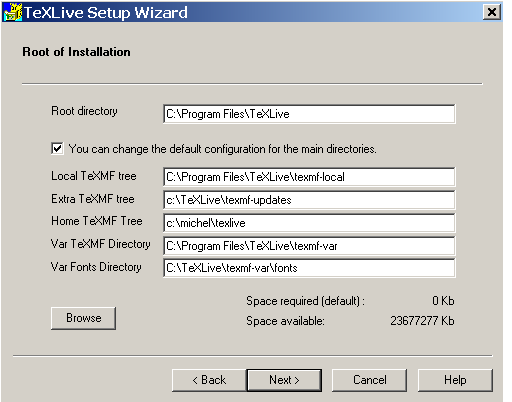
Here, in the Root directory part, you will find the default
values that fptex has chosen for installing the top
directories of the distribution (by default the C drive). You
probably will only need to specify the directory path for the Home
TeXMF Tree
, where you can easily add files to your TeX system (it
is here that you can, for instance, copy CERN-specific files that you
might need, see below). Once you are happy with the directory paths
you can once more hit the Next
button, which will proceed to
the screen where you can select the scheme
(file collection)
that you want to install.
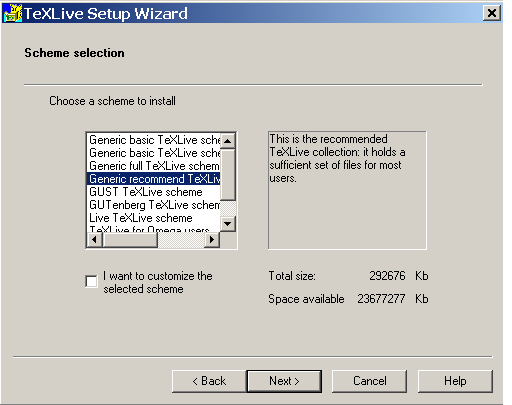
By default you will see the Generic recommended TeXLive scheme
preselected. It is highly recommended that you choose this selection
of files. You should only choose a different scheme if you know
what you are doing. The recommended
will copy somewhat less
than 300 Mbytes of files to your local hard disk. Hit the Next
button to start the installation.
Note that, as the installation procedure is the standard one as
distributed by the TeX Community, the CERN-specific
texmf-cern directory tree, that I maintain on Unix, is not
installed via this procedure. If you need files from that directory
tree, you will have to copy them yourselves to the working area where
your TeX files reside so that TeX can find them (for instance in the
Home TeXMF Tree
directory that you specified on the Root
directory screen described previously).